

Hey! I’m Alena, former AI startup CEO ($2M raised), Yandex and Acronis Sr. PM with 10k LinkedIn followers, 57% of my followers are senior leaders from big tech, good company ;)
Following up Lenny’s LinkedIn poll on how people use Claude Code for non-coding tasks. I think it was brilliant conversation and we can learn so much from that thread. Check the original post here.
Teresa Torres (bestselling author) wrote this:
I now write all of my content with Claude Code in VS Code. We iterate on an outline, it helps me improve the hook, it conducts research for me and adds citations to my outline, and it reviews and gives feedback on each section as I write.
Teresa doesn’t code. She writes books. Using a “coding tool” for everything.
So I scraped 159 comments from professionals using Claude Code. Categorized every single one. Let’s take a look which story data tells us:
What’s Claude Code and how to get started
Claude Code is Anthropic’s AI coding assistant that lives in your terminal or VS Code. But here’s the twist - it’s not just for coding. It reads, writes, and organizes any files on your computer. Think of it as having a smart assistant who can see your entire file system and help you work with it.
Getting started takes 3 minutes:
1. Open your terminal and install Claude.
2. Open it anywhere
In your regular terminal: Just type
claudeIn Cursor: Open the terminal tab (inside Cursor) and type
claudeIn VS Code: Same thing - open terminal, type
claude
3. Log in (first time only)
4. Talk to it
Just describe what you want:
“what does this code do?”
“fix this bug”
“add a login button”
Done! Claude edits your files right there.
Everyone is talking about context engineering, I believe it’s the easiest way to start use it as your tool.
Who’s using it
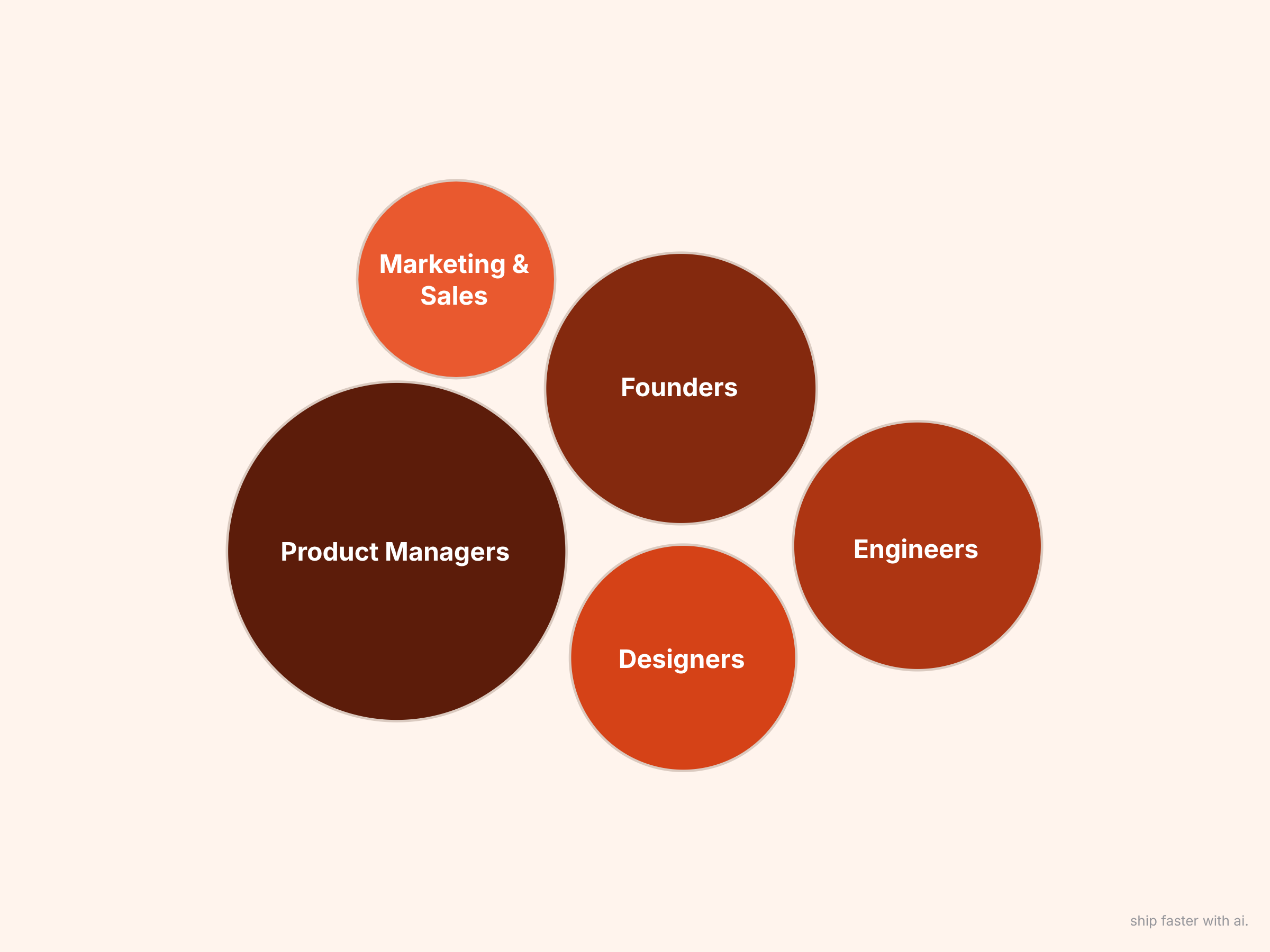
🥇 Product Managers: 38 people (24%)
🥈 Founders/Co-founders: 30 people (19%)
🥉 Engineers for non-coding tasks: 24 people (15%)
What they’re building
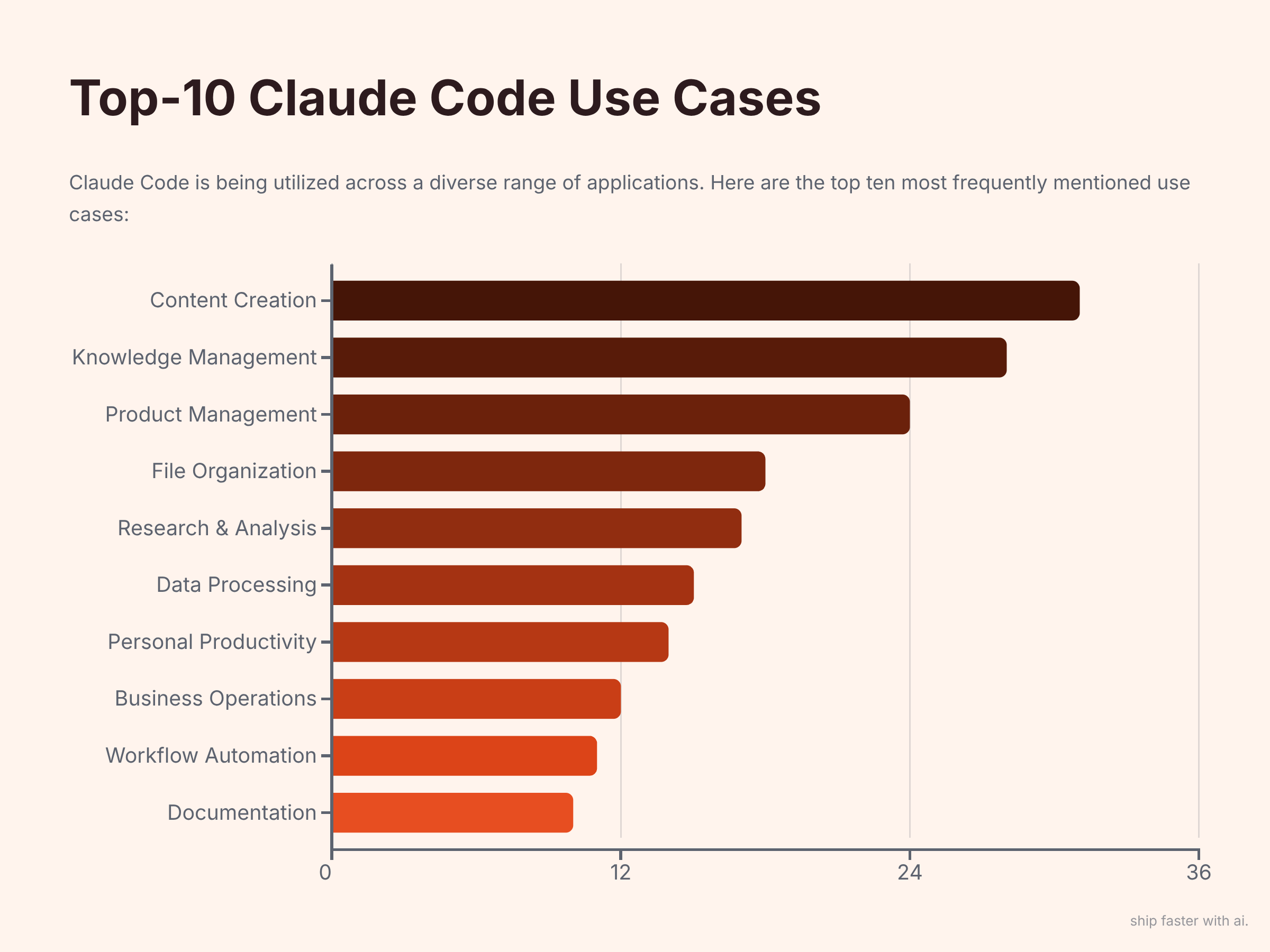
Content Creation, 31 mentions
Knowledge Management (aka Second Brain), 28
Product Management, 24
File Organization, 18
Research & Analysis, 17
Data Processing, 15
Personal Productivity, 14
Business Operations, 12
Workflow Automation, 11
Documentation, 10
Let me know your thoughts below and I’ll feature best comments in the next issue on this topic.
Now let’s dive into exactly how people use each category - with real examples you can implement today.
5 most popular use cases
01 Content Creation & Marketing (31 Users, Highest Engagement)
The Problem
Writing takes forever. Research is scattered. Quality is inconsistent.
Teresa Torres isn’t alone. 38 people shared similar workflows.
12 agents working sequentially from newsletter research to publish-ready article with gated PDF/Notion template...Repurposing all content (published/research) for Twitter, Substack notes, Medium, Reddit through specific agents
Ayush Poddar
Framework based on comments.
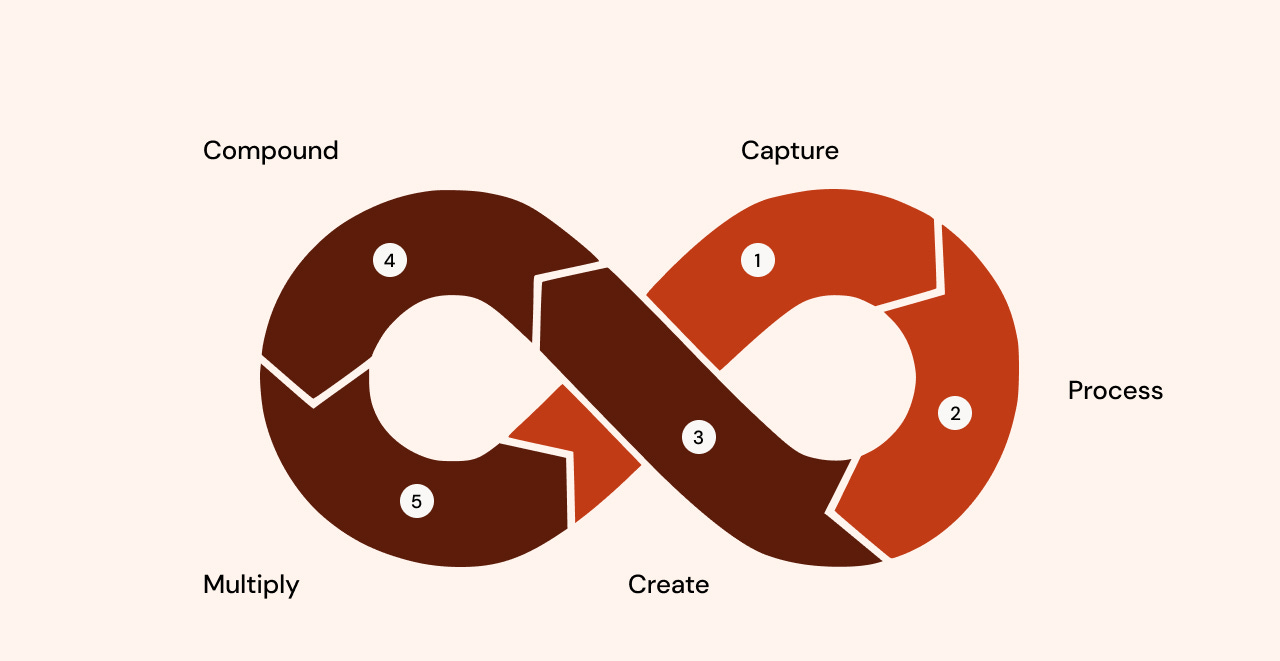
Stage 1: Capture → Everything becomes markdown
Stage 2: Process → Specialized agents extract value
Stage 3: Create → Multi-iteration refinement
Stage 4: Multiply → One source → many formats
Stage 5: Compound → Everything feeds back → Next content uses accumulated knowledge
Edgar’s Quality Gate System
Draft from docs → Rate 1-10 → If <9, loop back with fixes
Bans overused AI words (”seamless”, “leverage”)
Publishes directly to Notion with proper formatting
File structure example:
content-system/
├── 00-inbox/              # Raw captures
├── 01-research/           # Sources, transcripts, notes
├── 02-ideas/              # Brainstorms, outlines
├── 03-drafts/             # Work in progress
├── 04-published/          # Final pieces
├── 05-templates/          # Proven frameworks
├── agents/                # Agent instructions
└── analytics/             # Performance data
Your agent team
Core Agents
Librarian Agent: Organizes files, creates cross-links
Research Agent: Web search, competitor analysis, pattern extraction
Writer Agent: Knows your voice, past content, frameworks
Editor Agent: Enforces quality rules, scores output
Specialized Agents (task-specific)
Hook Optimizer: Tests 5-10 opening variations
SEO Agent: Keyword research, optimization
Visual Agent: Quote cards, diagrams, thumbnails
Distribution Agent: Formats and posts to platforms
Analytics Agent: Tracks performance, identifies patterns
Results
4-6 hours → 45 minutes per piece
Teresa Torres: Iterates on outlines, gets research with citations, receives real-time feedback on each section
Ayush Poddar: 12-agent pipeline from research to multi-platform distribution
Edgar: Quality gates ensure consistent 9/10+ output before publishing
But the most valuable source from the discussion is a GitHub repo containing a fully functional LinkedIn content creation machine that you can copy:
https://github.com/mslavov/linkedin
In the next sections, I’ll break down the remaining 4 popular use cases. There’s a special offer – a 60% discount and the LinkedIn Optimization Playbook for free. The methodology has already helped 3,000 professionals increase recruiter visibility up to 8x and land their dream jobs, from new grads to CEOs.
Feel free to unsubscribe anytime, no hard feelings!
02 Your Second Brain: Knowledge Management (28 Users)
You read this far — here’s a small thank-you. If you want to keep reading (this post + every past post), your first month is $5.20, that’s 60% off. Feel free to cancel in the first 30 days and you pay nothing more.
The $5 link is open until June 1st. After that, it goes back to full price.