

Aren’t you tired of new model appearing every day?
I used to think the model was the most important part. Now I’m convinced it’s the setup around it. It’s harness, it determines what the model can see, how it receives a task, where it does the work, and how the result is checked.
The popular harness is OpenClaw, 389k stars on GitHub. You’ve probably heard of it.

In this issue: 5 harness ideas from big boys and how to copy them
Devin: give AI a safe space to operate
OpenAI: write the instructions for each topic
Claude: load the right page only when it’s needed
GitHub Copilot: create a ticket
Cursor: ask AI to check the work before you see it
First, some context for those who are interested
Boring but interesting (skip to the ideas if you like)
OpenAI says what slows companies is how agents are built and run rather than model itself. Anthropic’s experiments with long-running agents found that even top AI, with simple prompt, fail to build a production-quality app, it improves dramatically when harness introduced though.
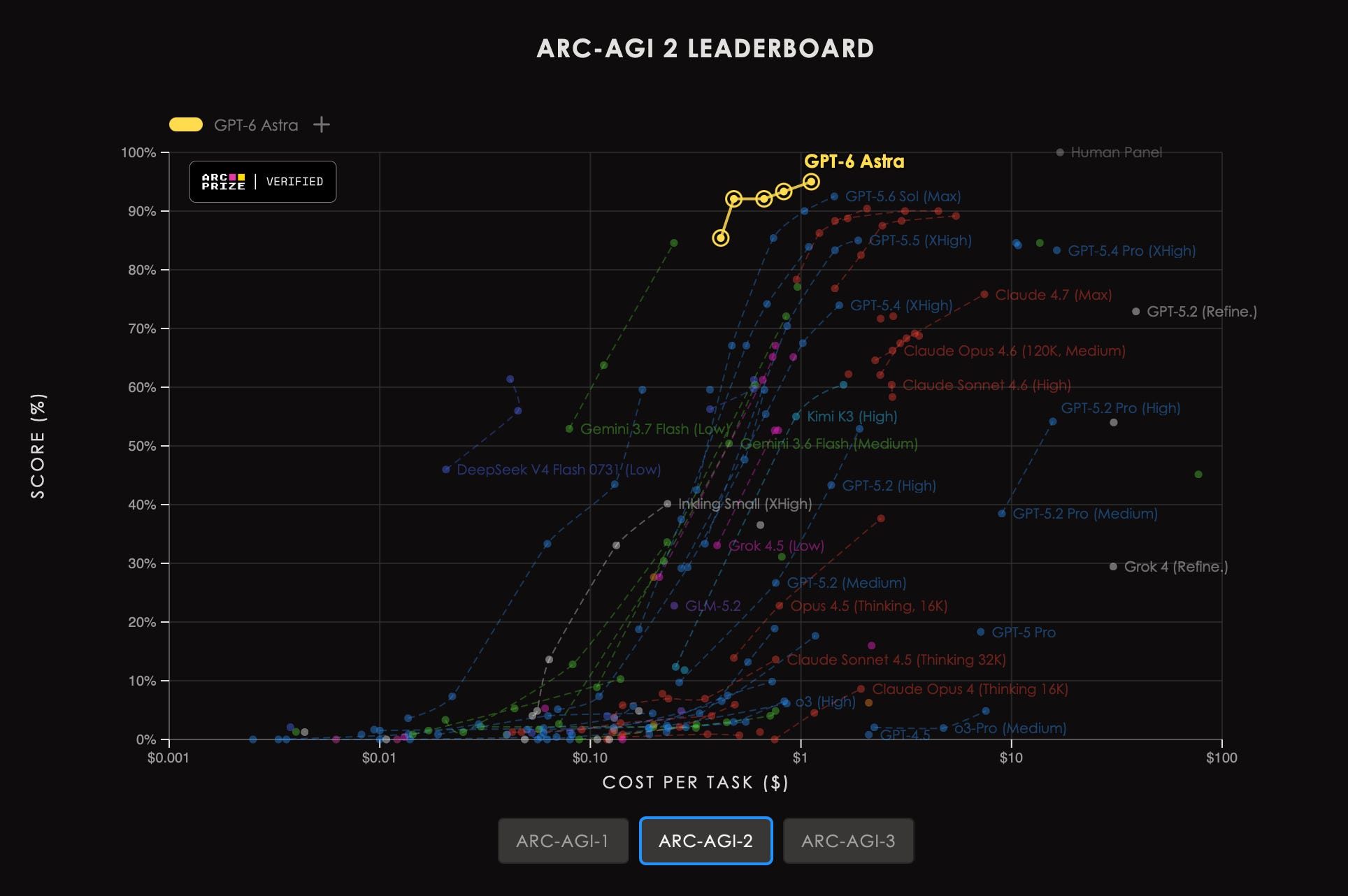
There’s a chart from AGI bench where human level 100% and as you can see Astra improved for 10% just running with harness.
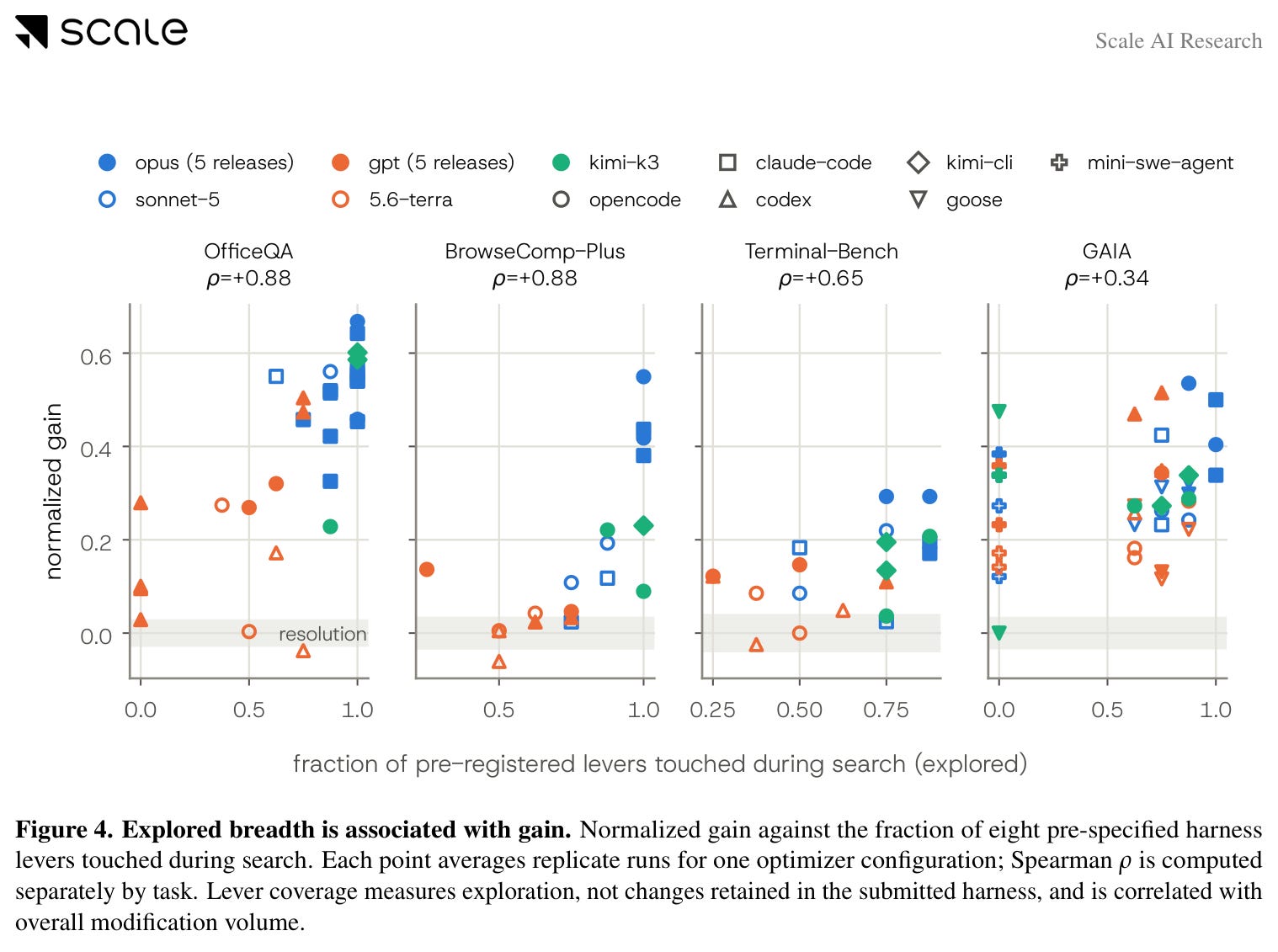
There is also beautiful research by scale AI locked the model on four tasks and let another AI rewrite only the harness around it: the prompt, the tools, the loop. The best attempts gained about 60 percent of the score that was there to gain, strongest on two of the four tasks.
Five ideas to copy this weekend
Five of the biggest AI tools are built around ideas small and simple enough to copy in a weekend.
Together they form a sequence:
Give AI a safe space to operate → write the instructions → load the right page → create a ticket → check its work.

You do not need to be a programmer to follow it.
1. Devin: give AI a safe space to operate
An AI that can act can also do damage: the wrong file overwritten, the wrong email sent. Before anything else, give it a safe space to operate.
Devin makes that space literal: every session runs inside its own computer, with a browser, a code editor and a window for typing commands, and the work happens there.
Anthropic’s Managed Agents split the brain (the model plus its harness) from the hands (the safe computers and tools that do the actions). OpenAI’s kit for building agents, the Agents SDK, draws the same line.
Idea: Give each AI project one bounded safe space to operate in.

You do not need to give it its own computer to copy the idea.
How to copy it:
Make one folder for the project.
Save the note below in the folder. Start the AI inside that folder if your tool can; either way, paste the note at the top of the chat.
The note looks like this:
For this project, you operate only in the project folder, only with the assets below, and only inside the boundaries below:

INPUTS
[list the files, documents or sources you may use]

TOOLS
[list the tools you may use]

OUTPUT
[where the finished work should go]

BOUNDARIES
- Do not modify anything outside this folder.
- Ask before using a tool or source that is not listed above.
- Never invent facts, names, numbers or links.
- Never send, publish, buy, delete or approve anything without me.
- [add your own boundaries]

INDEX
Longer rules live on these pages; open one, or ask me for it, when the job needs it:
- [Topic]: the [name] page.
2. OpenAI Codex: write the instructions for each topic
Before the AI starts working, give it written instructions about how work gets done here.
Codex and a handful of other tools turned that into a file called AGENTS.md, a plain text file that sits with the work and tells an agent what humans on the project already know: the house style, the commands, the limits, the tests and what “finished” means. By now more than 60,000 open-source projects have adopted it, and Cursor, Devin, Gemini CLI, GitHub Copilot and others read the format.
Claude Code reads the same kind of file under the name CLAUDE.md, and a chat app’s project instructions do the same job. Whatever it is called, the AI reads it before your first message, the way it reads a system prompt.
Idea: For each task, write instructions once.

How to copy it:
Open a blank document in the project folder from idea 1, one set of instructions for each topic that runs there (research rules, slide rules, email tone, etc.).
One page per topic.
Write only rules that are general for that topic.
The instructions look like this:
[Title, e.g. research]

Every time, in this order:
- [First step: what to open or pull, and from where]
- [Second step: what to draft, and from what starting point]
- [When it must be ready for me]

House style:
- [How long: one page, 200 words, five slides]
- [Spelling and names: British or US; how we write the company and product names]
- [How numbers, dates and titles appear]

Facts come from:
- [The one or two sources that count for this task]
- [Which source wins when they disagree]

Good looks like:
- [One finished example to match, and where to find it]

Never:
- [What must not be sent, changed or decided without approval]

Done when:
- [What must be true before you show me the result]

Who signs off:
- [Who approves which part, and how to mark the parts they have not seen yet]
3. Claude Code: load the right page only when needed
The instructions create a new problem: the AI has to read all of them to find the one it needs.
Claude Code’s answer is a habit Anthropic calls progressive disclosure: show the AI a little first, and let it open more only when the job needs it. Instead of reading every rule up front, the AI reads a short list of what exists, one line per page.
Anthropic’s Agent Skills work this way: folders of instructions for particular kinds of work. At startup, Claude sees each skill’s name and one-line description. It reads the full instructions only if the current job needs that skill. Google has since adopted the same format in its Agent Development Kit.
Idea: Build an index of the pages in the instructions, and let the AI open a page only when it needs one.
How-to:
Give every page a name and one line at the top saying when to use it.
List the pages under INDEX in the note from idea 1, one line each. That list is all the AI reads until a job calls for a page.
If the AI can see the folder, add one line telling it to check for new pages at the start of every session and add them to the index itself.
A filled-in index looks like this:
INDEX
Longer rules live on these pages; open one, or ask me for it, when the job needs it:
- Research and fact checks: the research page.
- Slides: the slides page.
- Email: the email tone page.
If you use a coding agent, a page is a SKILL.md file in its skills folder, and the tool builds the index itself from the first lines of every page.
4. GitHub Copilot: create a ticket
Once the AI knows the rules and has the right page open, the question is how you hand over work.
GitHub now lets you assign an issue, its name for a ticket, to Copilot the way you assign it to a teammate. The agent studies your project, plans the change, works on its own copy of the code, and packages the result for review.
Idea: Write tickets that describe what you want finished, the way you would for a teammate.

A useful ticket has four things that change with the job, and a few standing lines that do not:
Job: what needs to exist at the end.
Context: what it needs to know.
Constraints: what it must not do.
Done when: how you will decide it is finished.
How to copy it:
Add the ticket template below as a page, next to your other instructions, and list it in the index.
In the note from idea 1, add a rule: turn every request I give you into a ticket in this shape.
Add: ask me your questions and get my approval on the plan before you start.
A ticket looks like this:
ticket
Use this page when I hand you a job.

Treat this as an assigned job.

JOB
[What needs to exist when you are finished]

CONTEXT
[What you need to know]

CONSTRAINTS
[What you must not change, assume, send or decide]

DONE WHEN
[Concrete conditions the result must satisfy]

Start by showing me your plan.
After I approve the plan, do the work.

Do not use the chat itself as the finished work.
Put important decisions and results into the work itself.

Before you show me the result, run the quality gate.

[For risky jobs: stop and show me before each step, not only at the plan.]
5. Cursor: ask AI to check the work before the human sees it
Once an AI has a safe space to operate and a ticket to work from, a new problem becomes more important:
Who checks the work?
Cursor built one answer straight into the product.
In its shadow workspace, Cursor tries the AI’s edits in a hidden window, separate from your actual files. Automatic error-checkers run on those edits and send the errors back to the AI, which fixes them before anything touches your work. Cursor says letting an AI see the errors in its own edits is one of the biggest improvements you can make to the code an AI writes without changing the model.
In the long-running agent experiments mentioned above, Anthropic found the same thing: Claude often marked features complete without properly testing them, and giving the agent browser tools and telling it to test the app as a human user would made the results much better.
Idea: Put a quality gate between the AI’s output and your attention.

One rule I add myself: the agent may not change a file until it has written down the goal, how the result will be judged, and the steps.
How to copy it:
Add a page bellow to instructions
Add rule to operating space to run quality gate after task completed
Ask AI to show the gate note with task completion message
The gate looks like this:
Quality gate

Do not show me the result yet. Run the quality gate first, layer by layer.

Layer 1, check yourself:
- Does the result do the job in the ticket? Where it does not, say where.
- List anything you made up or guessed.
- Give your confidence, 0 to 100, and the reason.

Layer 2, check against the ticket, the instructions and the inputs:
- Every done-when condition in the ticket and in the instructions is met, and no constraint is broken.
- Every number that can be recalculated is recalculated.
- Names, dates and facts match the inputs.
- No section is missing, and the house style is followed.
- The result matches the example under Good looks like in the instructions.

Layer 3, check against the world, as far as your tools reach:
- Open every link. Compare every number with its original source.
- Run whatever can be run: the spreadsheet, the formula.
- Mark what only a human can verify, such as whether the audience understands it.

Fix what can be fixed. Then show me:
- the result;
- what failed a check and was fixed;
- which parts each approver has not yet seen;
- what still needs a human.
Final thoughts
Now you have your personal harness set up. It is one folder, and it answers the definition at the top: the AI works in the folder and reads the instructions and the pages kept there; the ticket hands it work, and the gate checks that work.
Models keep getting better and cheaper. Because the system around them is already set, each new model gives you more for less, without you rebuilding anything.
I’m opening six 1:1 AI working sessions
Bring one real problem with your AI setup. We’ll work through it together, with your hands on the keyboard throughout.
You’ll get:
A 90-minute working session
A written action plan with recommended changes and relevant resources
Seven days to ask follow-up questions by email or chat
You’ll leave with a clear plan, practical next steps, and a setup you understand well enough to keep improving yourself.
€250 per session
I’m limiting this to six sessions so I can give each person a full week of follow-up support.