Claude Skills: how you can stop re-explaining everything to AI.
You'll walk away with everything you need: what Skills are, how they work, when to use them — plus a Meeting Notes Analyzer you can build yourself in 30 minutes or download ready-to-use
You’ve surely heard about MCP over the last year and about Skills for the past 2 weeks, both concepts by Anthropic, both can be used to increase your AI capabilities. MCP was still a pretty “dev required” thing—you need an API key at least. Turned out that Anthropic realized that MCP doesn’t really fulfill user’s needs and came up with the Skills concept. And like MCP, it can be used with any AI; I tested it in Cursor. So you don’t really need to lock into Claude—think about it as an instructions template that is highly consumable for AIs.
In this issue I want to show you what Skills are at their core, best practices and limitations to consider, and how to find, build, customize and manage skills.
What’s Inside
The Matrix moment — Why Skills changes everything you know about AI automation
Token economics — How to cut costs 80% while fixing hallucinations
Skills vs MCP — Why Anthropic quietly abandoned their own protocol
30-minute build — Your first Skill that actually works (Meeting Notes → Action Items)
Security blindspots — What malicious Skills can do + protection protocol
The Cursor edge — Why some teams get 3x better results
Early adopter notes — Current limitations & workarounds that work
What are skills from the first principles
Remember how Trinity in The Matrix downloaded a helicopter piloting Skill? That’s pretty much it. If your Agent (can be a general agent like ChatGPT or specialized like Claude Code) has a skill, whenever you set a task that can be solved with that skill it will find, download and use it on demand.
If you have repetitive tasks or prompts that you store somewhere and paste every time you need to perform a specific task, Skills is the solution. Instead of explaining your process every single time you need something done, you create a Skill once – and Claude remembers it forever. Need a weekly status report? There’s a Skill for that. Want consistent brand colors in every presentation? Create a Skill. Have a specific way you analyze customer feedback? Package it as a Skill.
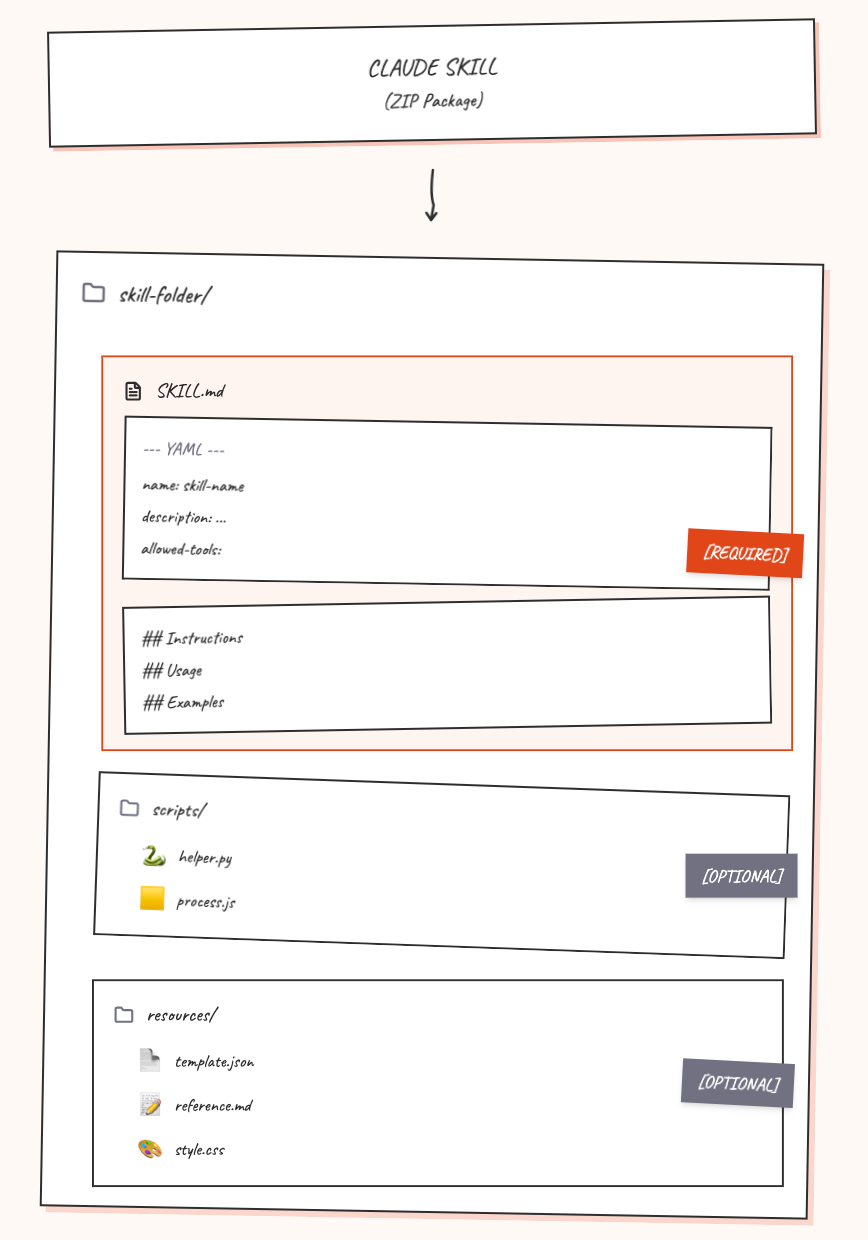
A Skill is a folder containing:
A SKILL.md file - This is your instruction manual. It tells Claude what this Skill does, when to use it, and exactly how to do it. You write this in plain text using simple formatting.
Optional extras - You can add template files, reference documents, example outputs, or even small scripts if you’re comfortable with that.
At its core, it has the idea of progressive disclosure (like in The Matrix) meaning that at every single moment it uploads only the necessary amount of information (=tokens), which saves you from two main problems:
→ Hallucinations and mistakes because it doesn’t contain huge unrelated context
→ High costs because it doesn’t upload all context, only what’s necessary
Here’s how it works in practice. When you start a conversation with Claude, it sees a short description of each available Skill (like “Creates weekly team reports with wins, blockers, and priorities”). These descriptions are tiny – they barely use any of Claude’s “memory” for the conversation.
When you ask for something that matches a Skill description, Claude thinks “Oh, this person needs a weekly team report!” and then – and only then – it opens up that Skill folder and reads the full instructions. It’s like having a filing cabinet where Claude can instantly grab the right procedure when needed.
What makes Skills different from other features:
Custom instructions - Those brief, always-active settings apply to everything. Skills are detailed procedures that activate only when relevant.
Projects - These are workspace-specific and accumulate context over time. Skills are portable recipes you can use anywhere.
MCP (Model Context Protocol) - This connects Claude to external data sources like your CRM or Google Drive. The main problem with MCP (Anthropic just admited it in this article is token consuptions – it was the main reason to shift paradigm from MCP or projects (also called Agents in Claude Code) to Skills.
Use Cases
You can use it for whatever you use AI for now. It’s better to use it for simple, separable, repetitive tasks. Think about baby skills: they learn how to hold a spoon and then they can hold it – it’s a skill. Eating dinner is a complex project that requires many skills. For the best results, use skills for small repetitive tasks, not for projects.
Here’s around 100 use cases for the reference:
Examples you can use today
Anthropic includes four Skills with every paid account:
pptx - Creates and edits PowerPoint presentations
xlsx - Works with Excel spreadsheets
docx - Handles Word documents with tracked changes
pdf - Manages PDFs (extracting text, merging, splitting)
The community has built hundreds more. Here are some favorites:
From Anthropic’s official collection:
canvas-design - Creates visual designs in PNG and PDF
brand-guidelines - Applies Anthropic’s brand colors and typography (you can adapt this for your company)
theme-factory - Generates consistent themes for documents and presentations
For more check out the Anthropic Skills repository or Awesome Skills collection on GitHub.
Limits to know
Maximum 8 Skills per conversation
Each Skill package can’t exceed 8MB
Skill names: 64 characters maximum
Skill descriptions: 1,024 characters maximum
Best Practices from official sources
Security: Please Read This Part
Skills run code in a secure sandbox, but you should still be careful:
Only install Skills from sources you trust. Just like you wouldn’t install random software on your computer, don’t install random Skills.
What could go wrong with malicious Skills:
Tricking Claude into doing things you didn’t intend
Leaking your private information
Misusing Claude’s capabilities
Safety practices:
If a Skill includes scripts (Python or JavaScript files), have someone review them before installing
Never put passwords or API keys directly in Skills
When installing community Skills, check the creator’s reputation
Review what the Skill does before uploading it
Think of Skills like browser extensions: incredibly useful, but install thoughtfully.
Let’s build something wonderful!
Let’s build a Meeting Notes Summary Skill together. This will take about 30 minutes and give you something immediately useful.
In the next sections, I’ll break down how to create your very first skill, what didn’t work out, share download link for my working Meeting Notes Analyzer and 8 usefull resources. There’s a special offer – a 60% discount and the LinkedIn Optimization Playbook for free. The methodology has already helped 3,000 professionals increase recruiter visibility up to 8x and land their dream jobs, from new grads to CEOs.
Feel free to unsubscribe anytime, no hard feelings!
Short preparation – I promise.
Before touching your computer, answer these questions:
01 What this skill will do?
Transform messy meeting notes into structured summaries with:
- Key decisions made
- Action items (with owners)
- Important discussion points
- Find inconsistencies and open questions
- Follow-up needed
For future: create JIRA tickets
02 What’s the input?
Raw meeting notes – could be bullet points, could be a transcript, could be scattered thoughts. It’s better to find last 5 meeting notes to give LLM an example how it could look like.03 What makes a good [your output acceptance criteria]?
This defines your quality standards.
- A clean, scannable summary formatted consistently every time
- Decisions are clearly stated
- Action items show who’s responsible
- Discussion points capture the key themes, not every detail
- Inconsistency, missing items and open questions are highlighted
- Under 2 pages no matter how long the meeting04 When should Agent use this?
When someone says “summarize these meeting notes” or “turn these notes into a summary” or shares meeting notes and asks for help organizing them.Creating skill with Claude
Step 1: Turn on skill-creator
Open Claude.ai in your browser
Click the settings icon (bottom left corner)
Click “Capabilities”
Find “skill-creator” in the list
Toggle it ON (the switch turns blue)
Step 2: Talk to Claude
Say what you want and answer questions. I suggest use Opus 4.1 for creating.
Step 3: Get your skill (1 minute)
Claude will generate your complete skill and give you a ZIP file to download.
Click the download link and save the file somewhere you’ll remember (like your Desktop or Downloads folder).
Go back to Settings > Capabilities in Claude
Scroll down to the “Skills” section
Click “Upload skill”
Find and select the ZIP file Claude gave you
Wait for the upload to finish
Important: Toggle your new skill ON (make sure the switch is blue)
Step 4: Test
Here are downloadable skill files and testing log.
Claude v0.1 - failed to wake the skill when I asked: “analyze meeting notes:”, had to add “using skill”
Step 5: Iterate
→ With Claude: go to the original chat with the skill creation conversation and list suggestions, get a new file
→ Manually: open SKILL.md and fix it
Creating and using Skill in Cursor
I created the same Meeting Notes Analyzer Skill using the same prompt and sent the link to Claude Code Skills Documentation.
The similarity: Skills don’t auto-activate reliably yet. In both Claude and Cursor, I had to explicitly mention “using skill” to wake it up.
The difference: Cursor created a much better structure and instructions and as a result better outcome. You can compare it in Notion log or here.
To fix calling problem I updated the skill description to be more trigger-friendly.
before
---
name: meeting-notes-analyzer
description: Transforms raw meeting notes (bullet points, transcripts, scattered thoughts) into structured, scannable summaries with clear sections for decisions, action items with owners and due dates, discussion points, inconsistencies, and follow-ups. Use when someone shares meeting notes asking for help organizing them, says “summarize these meeting notes”, “analyze this meeting”, “extract action items”, or “turn these notes into a summary”.
---after
---
name: meeting-notes-analyzer
description: Transforms raw meeting notes (bullet points, transcripts, scattered thoughts) into structured, scannable summaries with clear sections for decisions, action items with owners and due dates, discussion points, inconsistencies, and follow-ups. Use when someone shares meeting notes asking for help organizing them, says “summarize these notes”, “analyze this meeting”, “extract action items”, or “turn these notes into a summary” or phrases similar to it
---It didn’t work out – I think it’s still early stage, so you’d better explicitly mention that the skill should be used.
To fix Claude’s output quality I took skill.md from Cursor and replaced the Claude file and then repacked it as a skill for Claude. The result is closer to Cursor; still, Cursor feels better overall.
Key Takeaways
It’s still early stage, so it doesn’t work perfectly and you need to ask it to use the skill every time.
Skills are simpler than they sound. You’re just writing instructions in a text file and putting it in a folder. If you can write documentation, you can create a Skill.
Start small. Don’t try to automate your entire workflow at once. Pick one repetitive task that annoys you. Make a Skill for that. Then build from there.
You don’t need to be technical. The easiest path is letting Claude build the Skill for you using skill-creator. Just describe what you want.
Skills save time on repetitive work. Anything you do the same way repeatedly—that’s a candidate for a Skill.
Quality comes from good instructions. The better you explain your process in SKILL.md, the better the results. Include examples. Be specific about format and tone.
Security matters. Only install Skills from sources you trust. Review any scripts before uploading.
Useful Resources
Agent Skills Engineering Post — Technical deep dive into how Skills extend agent capabilities with modular, composable folders
Claude Code Skills Documentation — Complete guide to creating and managing Skills in Claude Code
Skills Support Article — How to teach Claude your preferred work approaches and methodologies
Skills Blog Announcement — Official introduction to Agent Skills across Claude apps and Developer Platform
Official Skills Repository — Anthropic’s collection of ready-to-use Skills
Skills Cookbooks — Code examples and recipes for building Skills
Awesome Claude Skills — Community-curated collection of Skills
Simon Willison on Claude Skills — Independent analysis comparing Skills to MCP, arguing Skills may be more impactful


